
If you’re tired of staring at a blank screen trying to come up with content that actually stops the scroll, this one’s for you.
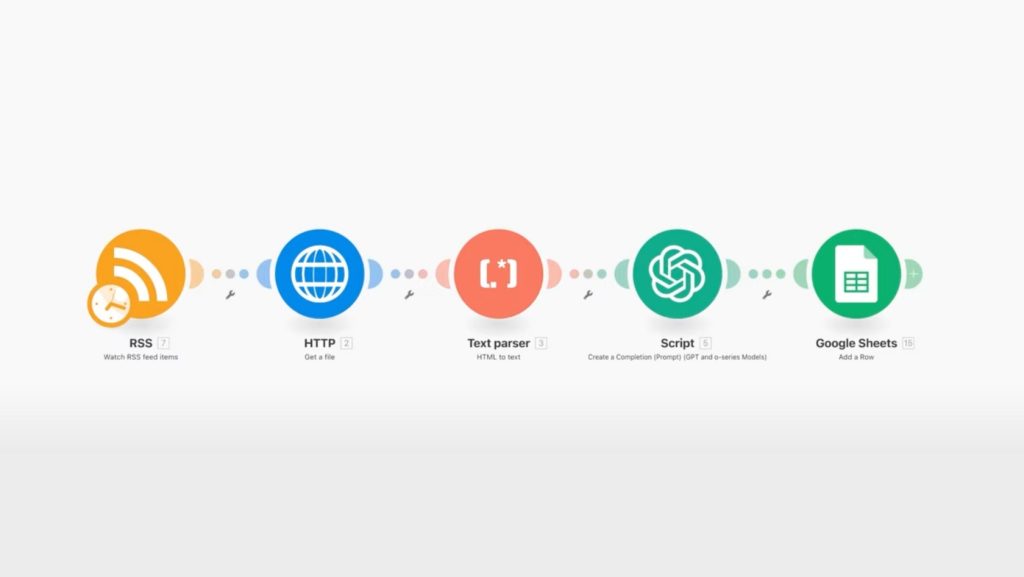
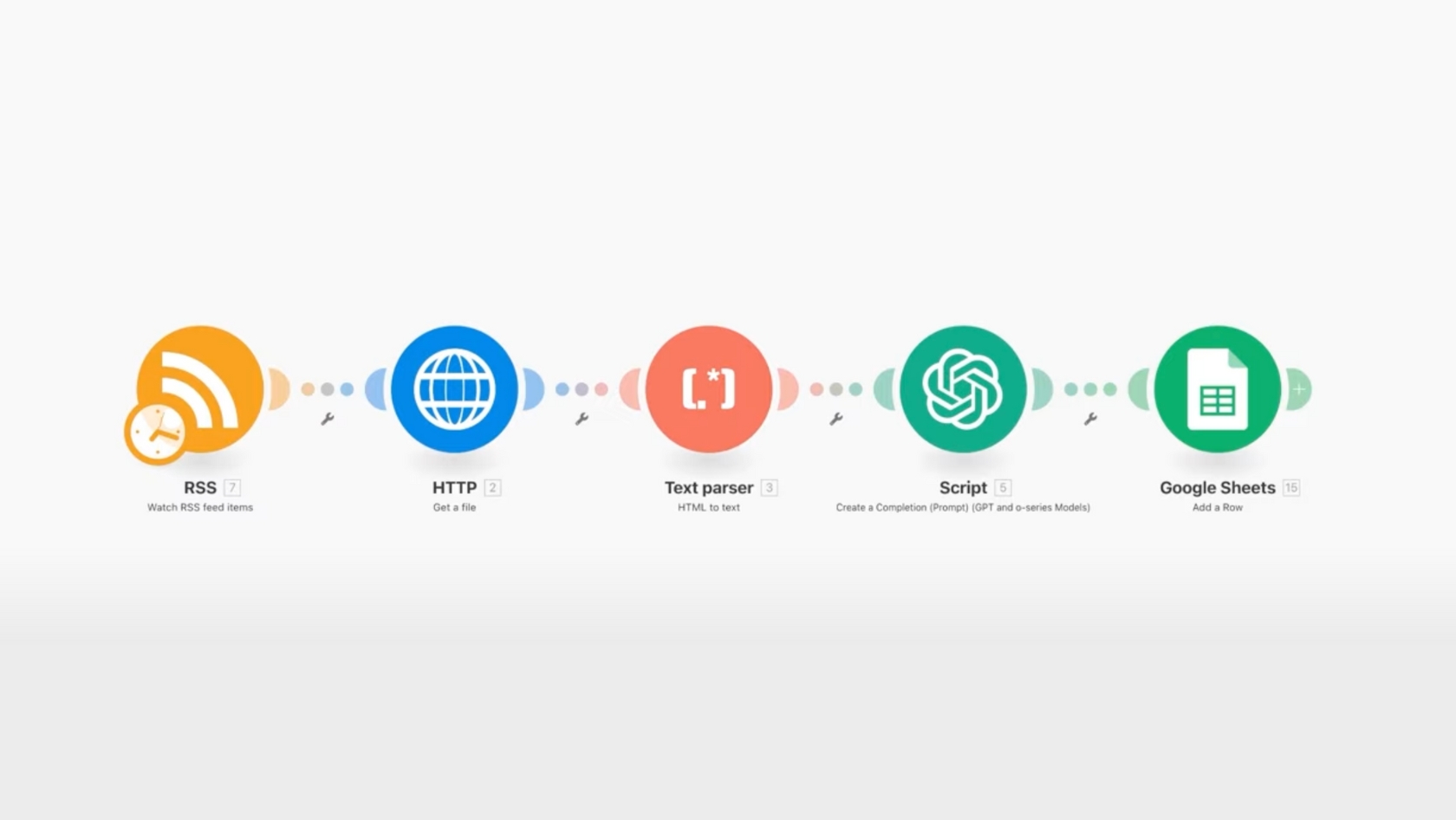
I’m going to walk you through a simple automation using AI that pulls hyperlocal news stories, rewrites them into scroll-stopping headlines, and drops them into a Google Sheet you can use to power your Instagram posts.
It takes about 15 to 20 minutes to set up, and once you turn it on, it runs in the background while you go live your life.

The Platform: Make (Formerly Integromat)
If you haven’t heard of Make, think of it as Zapier on steroids. It’s an automation platform that can connect just about any app on the internet.
Yes, it’s a paid tool. But for what you’re about to build, it’s worth every penny.
Step 1: Create Your Scenario in Make
- Click “Create New Scenario” in the top right.
- Name it something like **”Local Headline Post.”
- Add your first module by typing in “RSS” and selecting **”Watch RSS Feed Items.”
This module will monitor new stories from your local news sources via RSS feeds.
Step 2: Build Your Local News Feed
If you’re not already using RSS.app, it’s a powerful way to create custom RSS feeds from any public webpage. It’s cheap (~$10/month) and works great for building out a local news bundle.
Don’t just settle for the big outlets. Ask ChatGPT for help by using a prompt like:
“I’m a real estate agent in [Your City/Region]. Give me a list of hyperlocal news sources that cover everything from new business openings and local politics to school events and community spotlights.”
Paste that into ChatGPT, and it will return a full list of news sources specific to your area, from regional publications to Facebook groups, Nextdoor feeds, and Patch pages.
Then, in RSS.app:
- Click “Create New Feed.”
- Choose “Web Page to RSS.”
- Paste in the URLs from your ChatGPT results (start with Newsday if you’re in Long Island).
- Click **”Save to My Feeds.”
- Repeat for all local sources.
- Head to “Bundles” in RSS.app and create a new one that includes all your feeds.
Now you’ve got a supercharged feed of hyperlocal stories coming in 24/7.
Step 3: Connect the Feed to Make
Back in Make:
- Paste your RSS bundle URL into the RSS module.
- Set it to return 1 new item at a time. (You can adjust this later.)
- Choose a start date. I usually set it to the first of the current month.
Step 4: Scrape and Parse the Article Text
Now we’re going to pull the full article and convert it into plain text:
- Add an HTTP module > “Get a File”
- Paste in the URL of the article from the RSS feed
- Add a Text Parser module > “HTML to Text”
- Connect the output from the HTTP module to this one
At this point, you’re scraping live news articles and converting them into readable plain text.
Step 5: Summarize with ChatGPT
Next, we’ll plug that text into ChatGPT to generate a catchy, post-ready headline:
- Add a ChatGPT module > “Create a Completion”
- Under model, choose GPT-4o
- In the “message” section, set role to “user”
- Paste in your local news headline prompt (available inside BAMx)
- Set your max token count to 2048
- Make sure to pull text from the parser module as input
This is the most important part. The quality of your result depends entirely on how you write your prompt. (Don’t worry—we’ve got done-for-you prompts in BAMx.)
Step 6: Send the Output to Google Sheets
Now that ChatGPT has created a headline:
- Create a new Google Sheet titled “Local News Headlines”
- Add a new module in Make: Google Sheets > Add Row
- Authenticate your Google account and connect to your spreadsheet
- Map these three columns:
- Column 1: Original article title
- Column 2: Article URL
- Column 3: ChatGPT-generated headline
Step 7: Test It Live
Click “Run Once” and let the automation do its thing. You should see a new row populate in your spreadsheet. The article title, URL, and rewritten headline will all be there.
For example, it might pull:
- Original: “Crest Group lands $42.5 million loan for Long Island office portfolio.”
- Headline: “Crest Group Locks In $42.5M Office Loan for Hauppauge”
Bonus: Turn It Into a Post with Canva
Now let’s turn that headline into a graphic:
- Open the “Local News Template” inside BAMx (hosted on Canva)
- Drop in your new headline
- Replace the background image with a screenshot or stock photo
- Resize and position as needed
- Swap out the BAM logo for your own brand
- Download and post
That’s it. You’ve created a repeatable, scalable, AI-powered content system in under 20 minutes.
Let AI Work While You Work
Set the automation to run every 15 minutes, and it will continue to pull fresh local news stories into your spreadsheet without you lifting a finger.
This gives you a nonstop source of timely, local content you can repurpose for Instagram, email newsletters, YouTube Shorts—you name it.
BAMx members have access to our growing library of AI prompts, as well as weekly content drop, which includes AI prompts, anytime, day or night, including on the Skool mobile app.
Not a member yet? Sign up today for a 7-day free trial to see what you’ve been missing.