

If you’re not tapping into holiday content right now… you’re missing the easiest, most high-impact time of the year for hyperlocal content.
Between festive events, shopping pop-ups, and family plans, your community is literally searching for ideas every day. Parents are desperate for things to do with their kids that are festive, easy, and local.
Holiday content wins…and there’s one (easy) piece of content that performs extremely well every single year without fail…
A Holiday Lights Map
Here’s the scenario:
The kids are piled in the car. Cocoa in hand. Christmas music playing. The plan? Drive around town and have a magical night looking at lights. The reality? Finding one house with three inflatables and a single sad strand of lights wrapped around a tree.
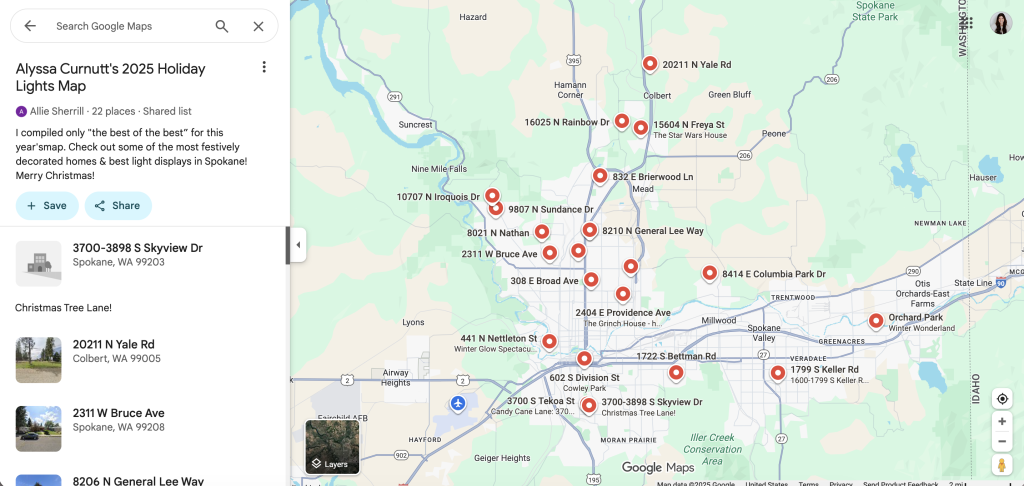
Enter: YOU to save the day…via a simple Google Map that shows all the best decorated houses in town: curated, verified, and ready to go.
And the best part? You can build this map AND create the video to publicize it in under an hour.
How to Make Your Own Holiday Lights Map (Step by Step)
Step 1: Find the Lights
Go to Facebook and search:
- “Holiday Lights in [Your City]”
- “Christmas Lights in [Your City]”
- “[Your City] Lights Map”
For Spokane, three different pages popped up with people sharing houses with great light displays. I put the best ones (with photo proof – I didn’t want to send people to duds!) in a spreadsheet.
Step 2: Create the Map
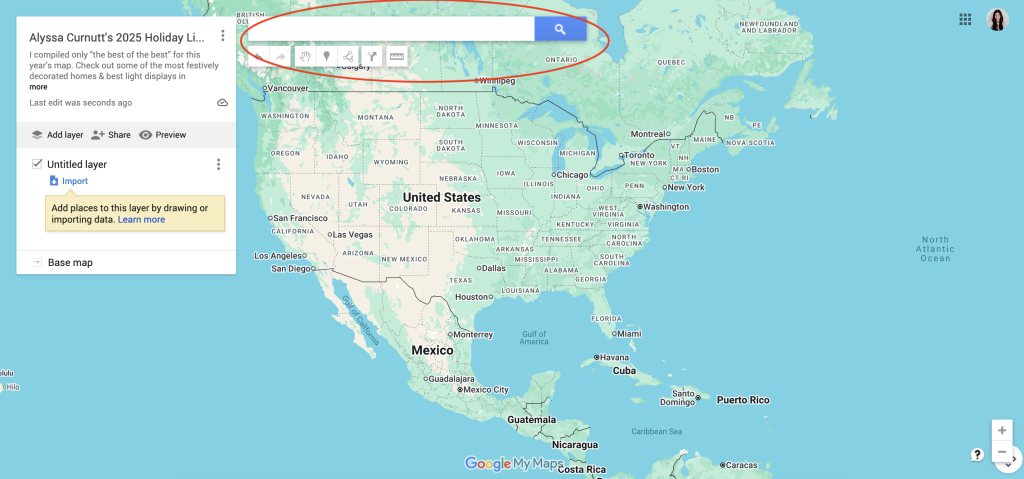
Head to mymaps.google.com, click “Create New Map,” and rename it. I called mine: Alyssa Curnutt’s 2025 Holiday Lights Map.
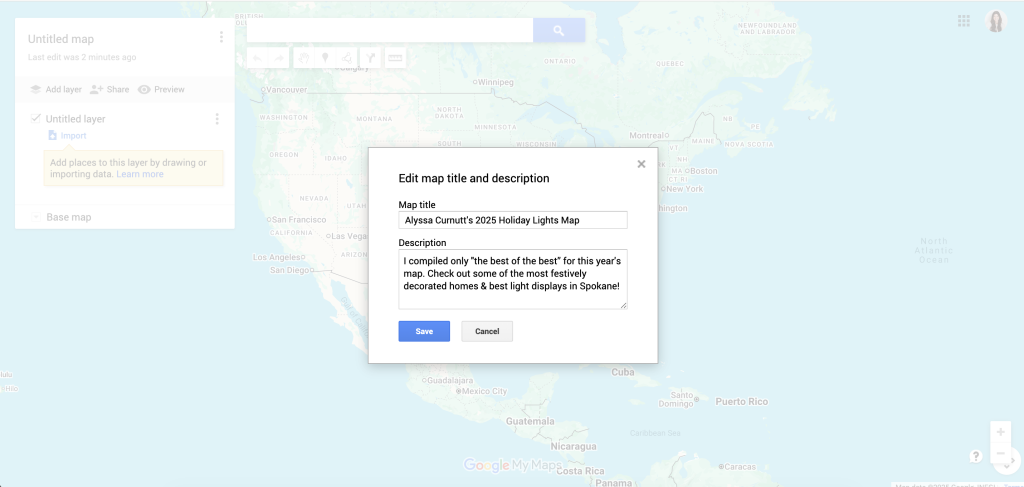
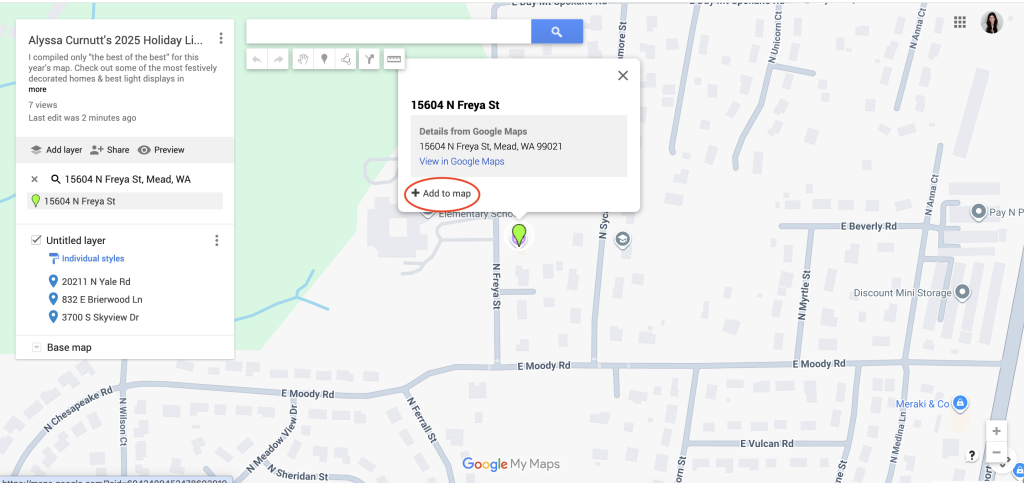
Then use the search bar at the top to enter each address and click “Add to Map.” (You can also upload a .CSV file!)
Once you’re done, click “Share” and you’ve got a link to your custom, shareable holiday lights guide.
How to Share It for Maximum Reach
I wanted to get as much mileage out of this map as possible, so I am sharing it throughout December in three different formats.
1. Green Screen Reel
I recorded a quick greenscreen using the Edits app, with screenshots of my map as the background (so people could see it’s real and get a preview of what they’re getting). I also added a video clip from last year of me and my girls looking at lights.
View this post on Instagram
2. Simple Text Overlay Video
I made a video with just a short clip and text:
“Hey Spokane: Looking for a map of the BEST holiday light displays in town? Check the caption to get it.”
View this post on Instagram
3. Carousel Post
Same concept, different format. This one is four slides with holiday light photos as the background.
Slide 1: “The Best Holiday Light Displays in Spokane”
Slide 2: Looking for the best holiday light displays in Spokane?
Slide 3: North Spokane, Liberty Lake, South Hill…I compiled them all in one easy map for you! (just include multiple areas around your town!)
Slide 4: Comment LIGHTS on this post to get the map!
(Repurposing = Reach. Don’t just post once and hope for the best!)
How to Collect Emails Automatically
I set up a Manychat automation and in each of the captions, I told people to comment the word “LIGHTS” to get their copy.
So any time someone comments LIGHTS on any of the posts above, they automatically get DMed a link to my landing page to get the map. My landing pages are hosted on FloDesk (my email service provider). Once they enter their name and email, they are automatically able to download the map AND it’s emailed to them.
From my one green screen video, 729 people commented on the video and downloaded the map (so far). That = 729 names and email addresses that I now have…and that means 729 new subscribers added to my weekly email newsletter.
It’s all happening in the background. Just from one piece of content.
Final Thoughts
Holiday content is the best lead magnet you’ll create all year.
You’re building trust, showing up with value, and making life easier and more enjoyable for your community during the busiest season of the year.
And this lights map? It’s fun to make, easy to share, and genuinely helpful.
For more hyperlocal strategies, I put together my full Hyperlocal Content Blueprint filled with tips and tricks just like this over in BAMx. Click here for a free 7-day trial!