

A few years ago, when you Googled “Real Estate Agent Near Me,” you would see a couple of PPC (pay-per-click) ads from platforms like Dave Ramsey, Homelight, Agent Pronto, FastExpert, and so on. If you were enrolled in one of these programs, you would have to cough up a hefty referral fee ranging from 25-40% to get a lead from them.
We were part of this club ourselves, enrolled in Dave Ramsey’s ELP (Endorsed Local Provider) program. We had to jump through hoops like a monthly call, a $400 monthly fee, and a large referral fee when we closed a sale. Then, Google introduced “Google Guaranteed” or “Google Local Service Ads,” and the game changed.
Google Local Services Ads (GLSA) are a beacon of light for local service-based businesses, appearing at the very top of Google search results, even outshining traditional PPC ads. They pop up when users search for specific services in their area. These ads help local businesses connect with people who are actively searching for the services they offer. Unlike traditional PPC Google Ads that charge per click, Local Services Ads charge per lead. That means you only pay when you receive a phone call or message from the ad.
Google Local Services Ads for Real Estate Agents
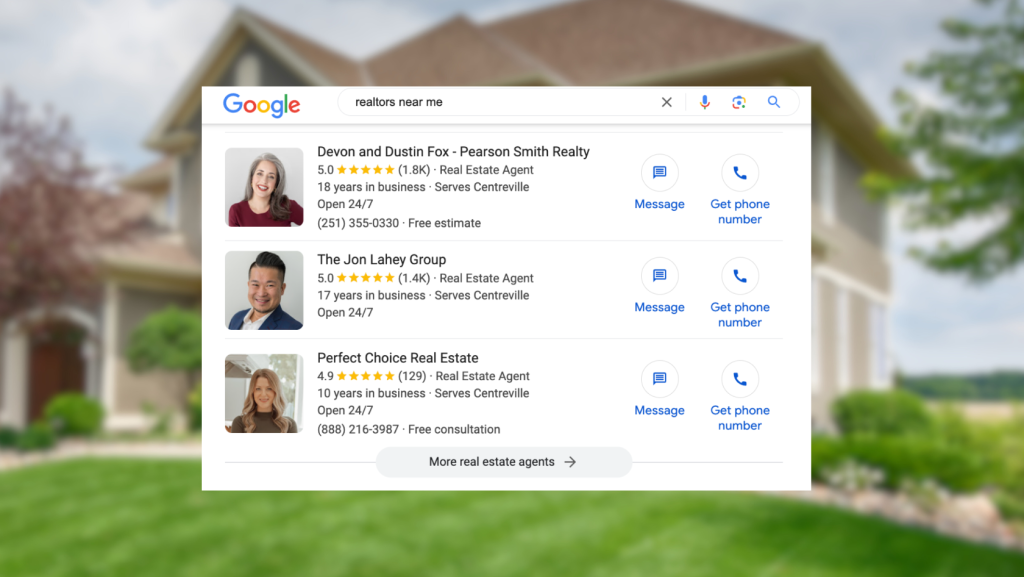
Why is this such a game-changer? Imagine you are a shopper Googling “Realtors Near Me.” The first thing you see is a GLSA. See the below screenshot for an example and you’ll find my lovely wife Devon’s profile.

Google played a masterstroke here. Why sell a PPC lead to Homelight or Dave Ramsey when you can get an agent to pay $60-$75 per lead directly? Plus, the ad says “sponsored” in small print at the top, but even larger, it says “Google Screened.”
If a curious consumer clicks “Details” to find out what “Screened” means, they read this:
Badges of Confidence
Businesses that go through screening and pass all the required checks earn a badge. Look for the Google Screened badge on their ad or profile.
Google Screened
Google Screened professionals have passed license checks. Some are also required to pass background checks and show proof of insurance.
GLSA is the best lead platform for sellers we have ever seen. Sure, you might get a few unwanted leads like contractors, cleaners, or apartment renters, but you can dispute and often not pay for them. You only pay for these when a potential buyer, seller, or renter calls or messages you directly.
Businesses that go through screening and pass all the required checks earn a badge and can start advertising. Look for the Google Screened badge on their ad or profile.
Tips to Maximize Your GLSA Leads
Set your profile up for automatic max bidding.
Last month, our average was $70 per lead. Google just added the ability to set a maximum cost per lead. We average 10 leads a week, and when we switched a set max cost, it went down to two, so we don’t recommend it.

Set your budget to the max of $34,999,999 weekly budget.
You might be picturing a nightmare scenario with $35,000,000 a week flying out of your pocket. Fear not, unless you are in a densely populated area like NYC—there simply are not enough real estate direct calls to drain your bank account.

The Golden Rule: Answer all the calls.
Google is like a strict school teacher—they will not recommend you as a trusted provider if you keep skipping class. Missed calls will drop you in the rankings fast. If you’re not receiving any leads, it’s typically one of three reasons. Either you’re missing calls (check your lead page to see if you have missed calls), your competition has a lot more reviews, or your business verification has expired documents.

Download the Google Local Service Ad app.
Book all calls and add details immediately. I find the browser app works better to book leads than their phone application.
Gather as many reviews as possible.
According to Google, “our rating and number of reviews factor into profile quality. Higher quality profiles may rank higher and may also pay lower costs per lead.” So, start being maniacal about gathering those reviews.
Choose your profile picture wisely.
GLSA is a bit of a diva when it comes to profile photos. They only allow one headshot – no logos, no group photos, just your lovely face. Fun fact: my wife’s photos got a lot more calls than mine. I guess good looks do win people over!
Ask leads what brought them to you.
Finally, Google will notify you with a “Call from Google, press one to accept” message whenever you receive these leads. We always pretend to not know how they found us and casually ask every caller, “How did you find us?”
The prospects usually say, “You guys have incredible reviews!” This helps them feel better about their decision to call you and applies Robert Cialdini’s commitment and consistency principles.
For more real estate tips, tricks, and marketing tactics, check out my book Six Weeks to Real Estate Success.