
We’re throwing a spotlight on two new Instagram features.
First, you can now add tagged posts to your own profile grid. Take a moment to think about the potential for this one. Instant testimonials and local street cred. In seconds.
Second, you can now use the Edits app to create carousels. As one Instagram strategist pointed out, this means “no more having to use loads of different apps to create content.”
If you’re already using Edits for reels, this is an easy one to get started with.
Read on for the rundown of both updates, along with some ideas for putting them to use in minutes (or less).
Let’s get into it.
#1. Add Tagged Posts to Your Profile Grid
Head of IG Adam Mosseri posted this reel briefly to announce the tagged posts update:
View this post on Instagram
It’s short but it covers the bases. For a clean, step-by-step guide to the feature, check out Instagram coach Brock Johnson’s carousel demonstrating just how easy it is to do this. He also highlights what this feature does for content creators and small business owners.
View this post on Instagram
Imagine a client or a local business tags you in a post (maybe recommending you as an agent or thanking you for the video you filmed that got their business in front of more people), and you add their post to your grid so anyone visiting your page can see it.
“This is free publicity and brand awareness!”
Johnson also reminds his audience, “ALWAYS tag the brands you support and love.”
“It’s a great way to get noticed by them, and maybe even end up on their grid.”
Remember to use this feature in your next hyperlocal post.
#2. Use the Edits App to Create Carousels
Next up is the Edits update, which allows content creators to make carousel posts as well as reels. An Instagram strategist who goes by Camilla (aka @pinkstormsocial) made absolutely clear how thrilled she is with this development:
“We can now create carousel posts in Instagram’s Edits app and it’s so much easier than creating them in Instagram.”
View this post on Instagram
Camilla’s post lays out three steps:
- Click the +
- Choose Carousel
- Upload up to 20 photos and/or videos as norm
If you can’t see Carousel as an option, tap your profile pic, go to Labs, then to Carousel Editor, and turn it on.
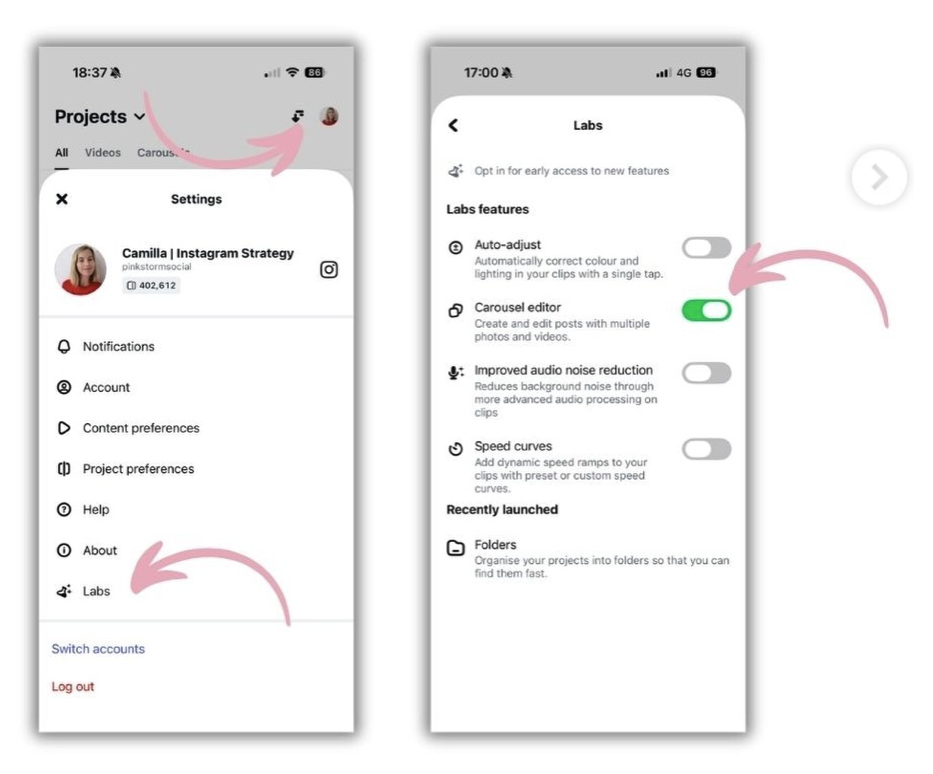
Source: Instagram
She also highlights some of the perks of this update:
- Easily add text over images—and “finally” over videos
- 100s of fonts to choose from, including the popular Advercase
- Trendy colors to choose from, including baby pink and butter yellow
IG creators using this feature can also:
- Duplicate photos with one click
- Rearrange the order of the slides
- Add audio
- Choose from a variety of layouts
As Camilla says:
“If you haven’t explored Edits yet, you’re missing out!”
Which of these updates will you use first?