

What if I told you a $20-a-month AI tool could do your staging, design, and marketing in seconds? It sounds like a late-night infomercial, but I’m dead serious. The latest update from ChatGPT Plus can now create insane images on demand. I’m not talking about their previous iteration of DALL-E either.
Think virtual staging, interior design renderings, custom graphics, you name it. The standard $20/month ChatGPT Plus will do the trick for these image hacks, but note that the free version won’t support the fancy image-generation features we need.
I even pay for the higher-tier ChatGPT Pro plan at $200/month for unlimited access (that’s how much I believe in this!). The Pro account also gives you more access to their newest tool, Deep Research, which is incredible for comparable market analysis.
For those unfamiliar, ChatGPT isn’t just about text anymore. ChatGPT can now create unique images from a simple conversation – upload a photo, describe what you want, and it generates a selection of visuals you can refine.
Below, I’ll walk you through 8 mind-blowing ChatGPT image hacks every agent should know, with practical tips and use cases.
1. Virtual Staging
Empty listing? No furniture? No problem. Virtual staging with ChatGPT is like hiring a digital stager who works in seconds. This hack alone can save you hundreds of dollars a year on virtual staging costs. This typically costs you $25-$100 an image, depending on the company.
How does it work? With ChatGPT Plus, you can upload a photo of an empty room (use professional photos) and ask the AI to furnish it in whatever style you want. In seconds, you get a realistically furnished image of that room – couches, tables, plants, decor, all virtually added. Generative AI can add furniture to images of empty rooms within seconds, and the results look shockingly real.
To do this, I simply tell ChatGPT something like:
“Here’s a photo of an empty living room. Please stage it with contemporary furniture, light colors, and a cozy vibe.”
ChatGPT then produces an image with sofas, rugs, wall art, you name it. There are AI tools out there (like Virtual Staging AI) specifically for this purpose, already transforming vacant spaces into beautifully staged rooms for agents. But with ChatGPT, you have an all-in-one solution at your fingertips.
Let’s see it in action.
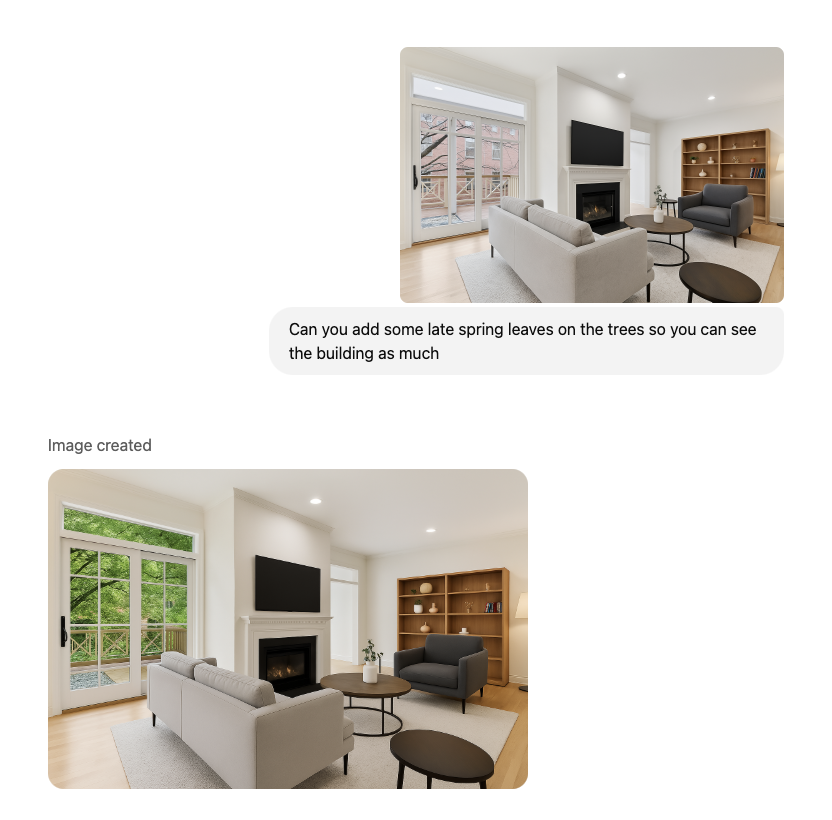
Before: The image below shows a living room that looks beautiful but has some dated furniture in it.
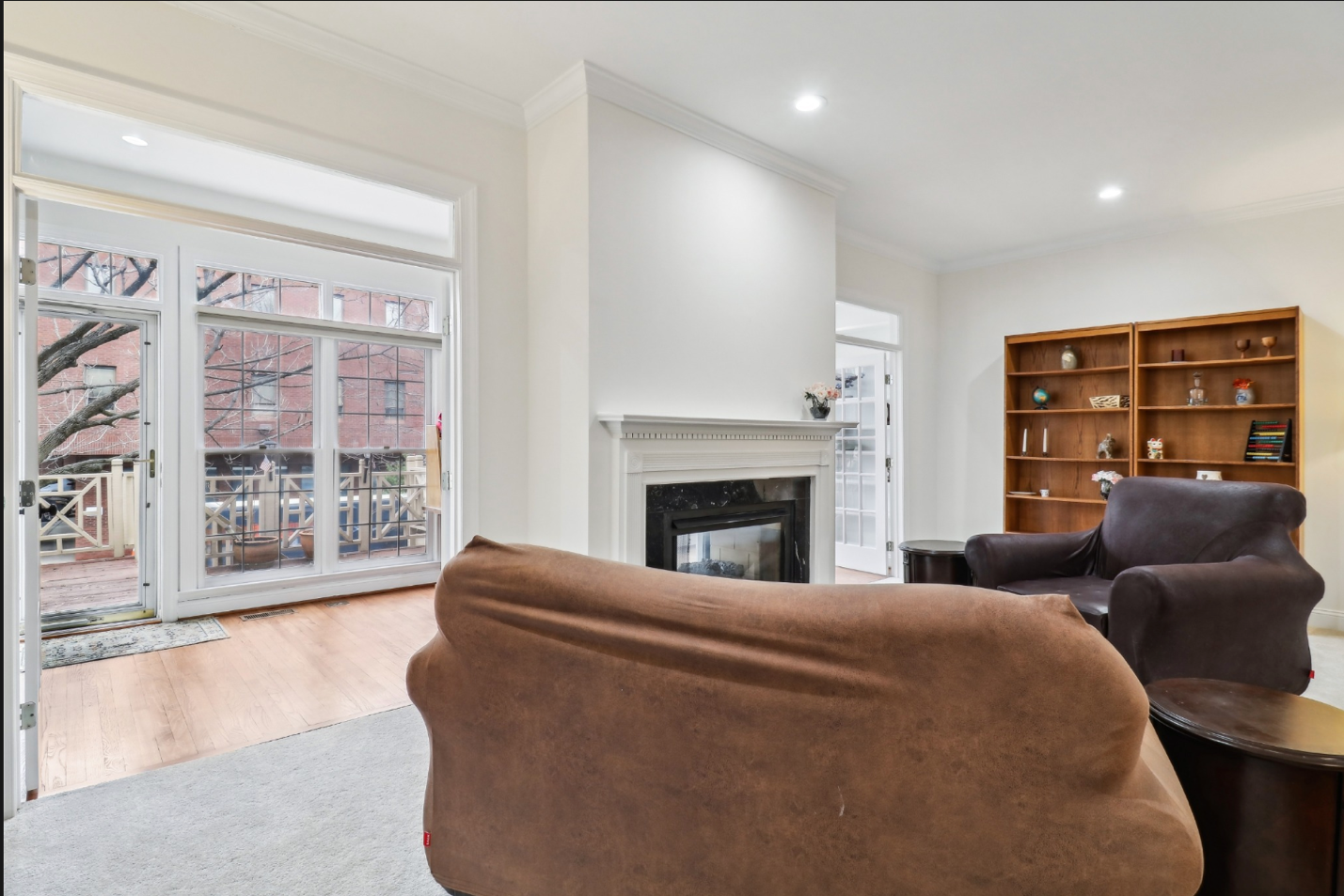
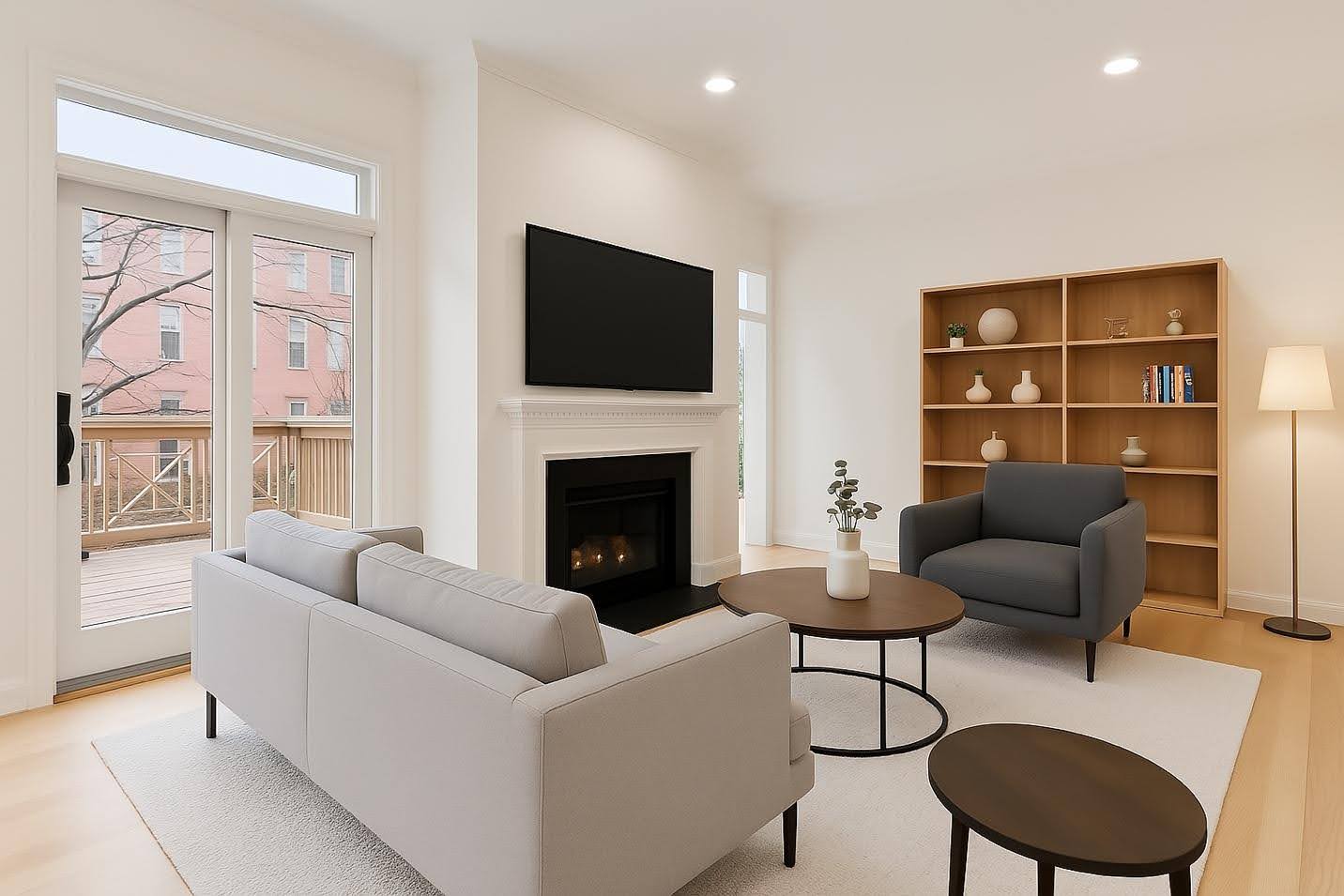
The bottom line: virtual staging through ChatGPT just became a lot cheaper and faster. I would be very worried if I owned a virtual staging company.
You can take it a step further and add some leaves to those barren winter trees.
2. Create Award-Winning Real Estate Ads
Ready to level up your marketing materials?
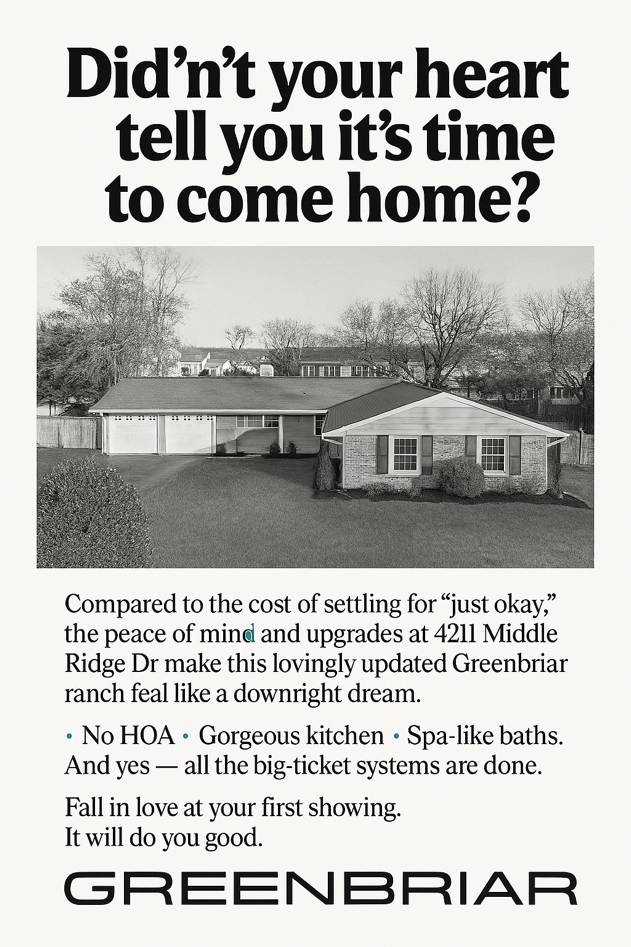
ChatGPT’s new image generation isn’t limited to interior photos. It can also help you whip up eye-catching real estate ads and graphics for your listings or brand.
As an agent, you know the importance of visuals in ads: a scroll-stopping image on Facebook or Instagram can make the difference in attracting a buyer or getting a new lead. With ChatGPT Plus, you can generate custom images tailored to your ad needs, then easily add text or branding using a tool like Canva if needed.
For example, take a classic advertisement that you’ve seen online or in a magazine.

3. Interior Remodeling Renderings
How many times have you heard a buyer say, “I love the layout, but I just can’t picture it with a renovated kitchen,” or a seller ask, “What updates should I do to get top dollar?”
With the new image gen capabilities, you can generate interior remodeling renderings to help clients visualize changes before committing to them. This is like having a virtual renovation planner on call.
Here’s how I use it: I take a photo of a dated room (let’s say a bathroom with late 90s brass fixtures) and feed it to ChatGPT.
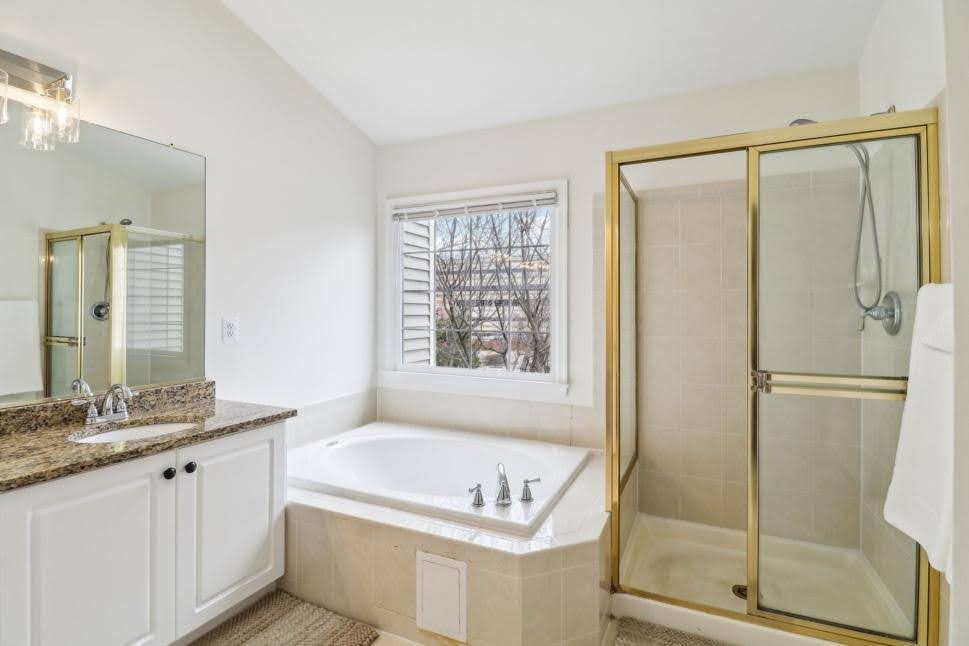
“Give me three different prompts for virtual renovations for this bathroom to modernize without a full-scale remodel.”
It’s important to start with the prompts so you show your clients multiple options.
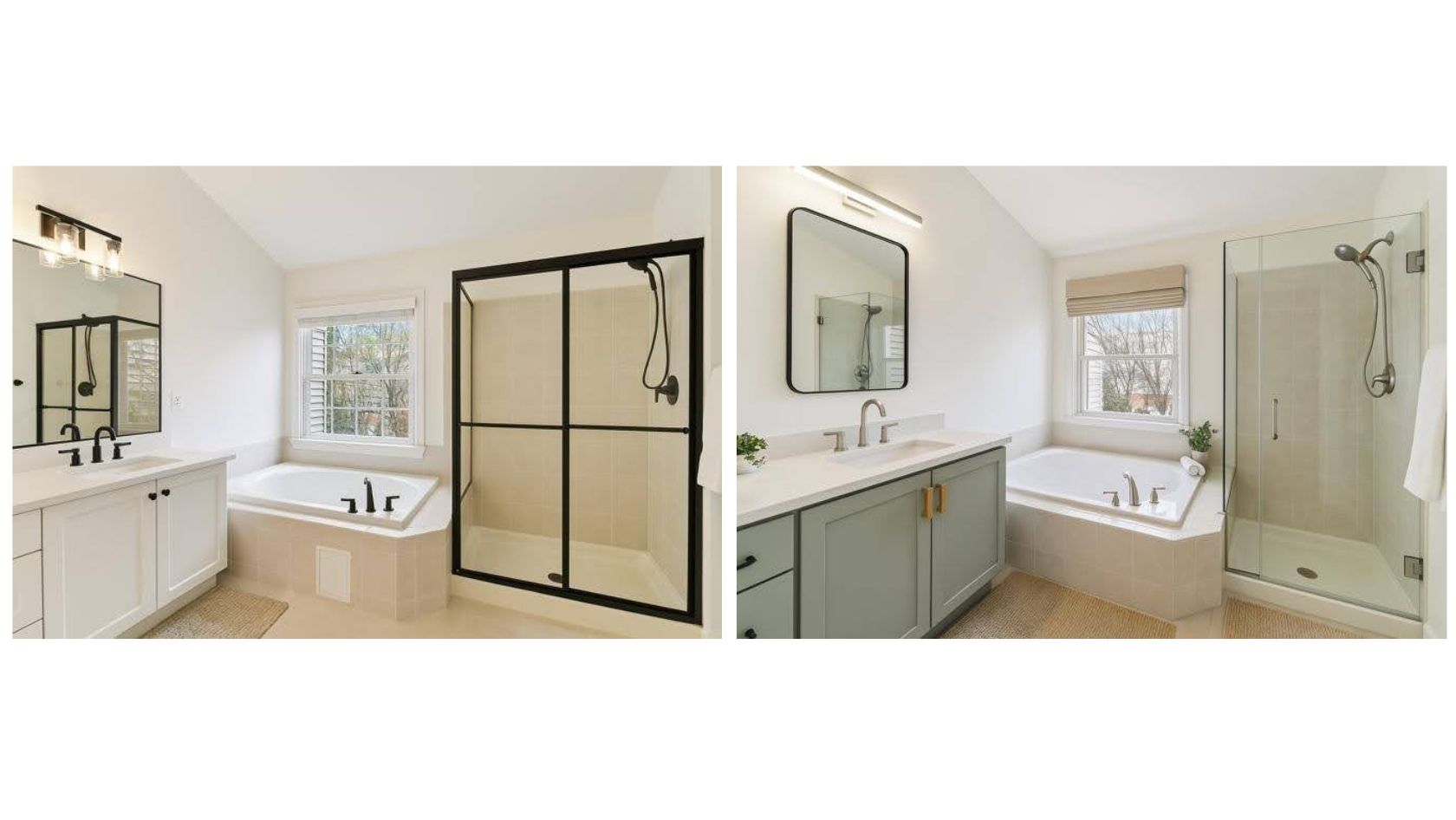
ChatGPT will output an image of that very bathroom, transformed as requested. It can change wall colors, swap flooring, update fixtures—essentially produce an “after renovation” picture based on the “before” photo you provided. It’s amazingly accurate for visualizing new finishes.
I recently sent my contractor these photos and asked him to give me a ballpark quote to do this work. His response: “Are you working with another contractor? Who made you those renderings?
The benefit to agents is huge: you’re helping buyers and sellers see the vision. If a buyer is stuck on some ugly wallpaper, show them a version with it removed and with fresh paint.
If a room is empty, show it furnished. If a floor plan feels closed, show a concept of a wall opened up. This hack impresses clients and can speed up deals, because when people can visualize the end result, they’re more likely to move forward.
4. Easy Infographics
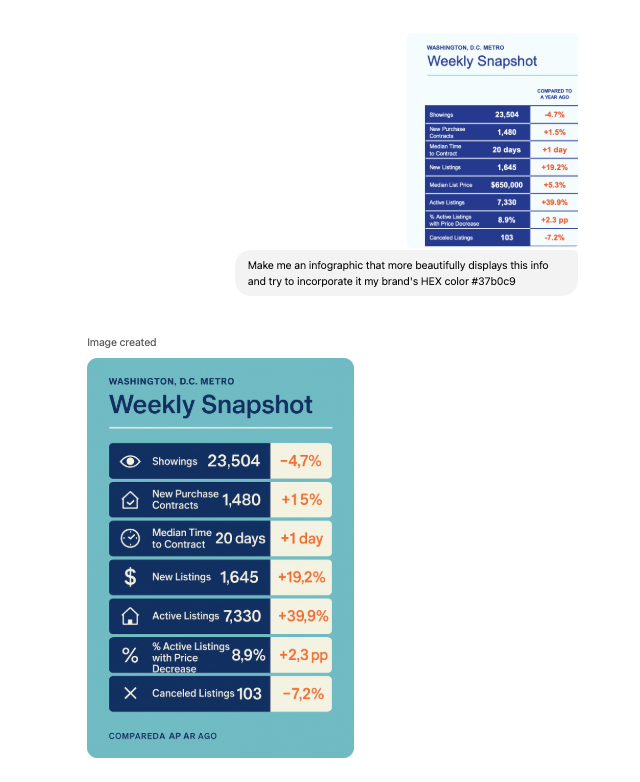
Being a real estate agent isn’t just about houses – it’s also about educating clients and marketing your services. Infographics are a fantastic way to convey information (market stats, process steps, etc.) in a visual, digestible format. The problem is, making a good infographic can be time-consuming if you’re not a designer. With a little creativity, you can use ChatGPT to generate the components or ideas for infographics, making the process much easier.
Here’s a simple approach: ask ChatGPT to create an image or illustration that represents data or steps, and then refine it in Canva.
For example, I might prompt,
“Take this market data and make an infographic, and use my brand’s HEX color #37b0c9.”
ChatGPT can generate a graphic with those icons arranged in sequence.
Or I could say,
“Show a bar chart comparing last year’s home sales to this year’s in a modern, clean style.”
I’ve even had it generate a fun graphic of “Dos and Don’ts for Home Sellers” with little cartoon icons (a thumbs-up and thumbs-down) next to each. I then added the actual text to it in Canva.
The key is to leverage ChatGPT for the creative heavy lifting: coming up with the visuals, layouts or themes.
Then you put on the finishing touches. Using Canva alongside ChatGPT is a killer combo here. Canva has templates for infographics; you can drop in the AI-generated icons or images into those templates and add your text.
This saves a ton of time compared to hunting for stock icons or starting from scratch. Plus, the styles ChatGPT can generate are endless – want a playful, hand-drawn style infographic? Just ask. Want a sleek, techy style? Done.
5. Community Maps
When selling a property, especially in a particular neighborhood or community, it’s awesome to provide a visual map highlighting local amenities like parks, schools, restaurants, etc.
Usually, you’d hire a graphic designer or use Google Maps screenshots (boring!) to create something like this. For instance, I screenshot a Google Maps search of all the cafes in Centreville, VA. Now, I just ask ChatGPT to do it.
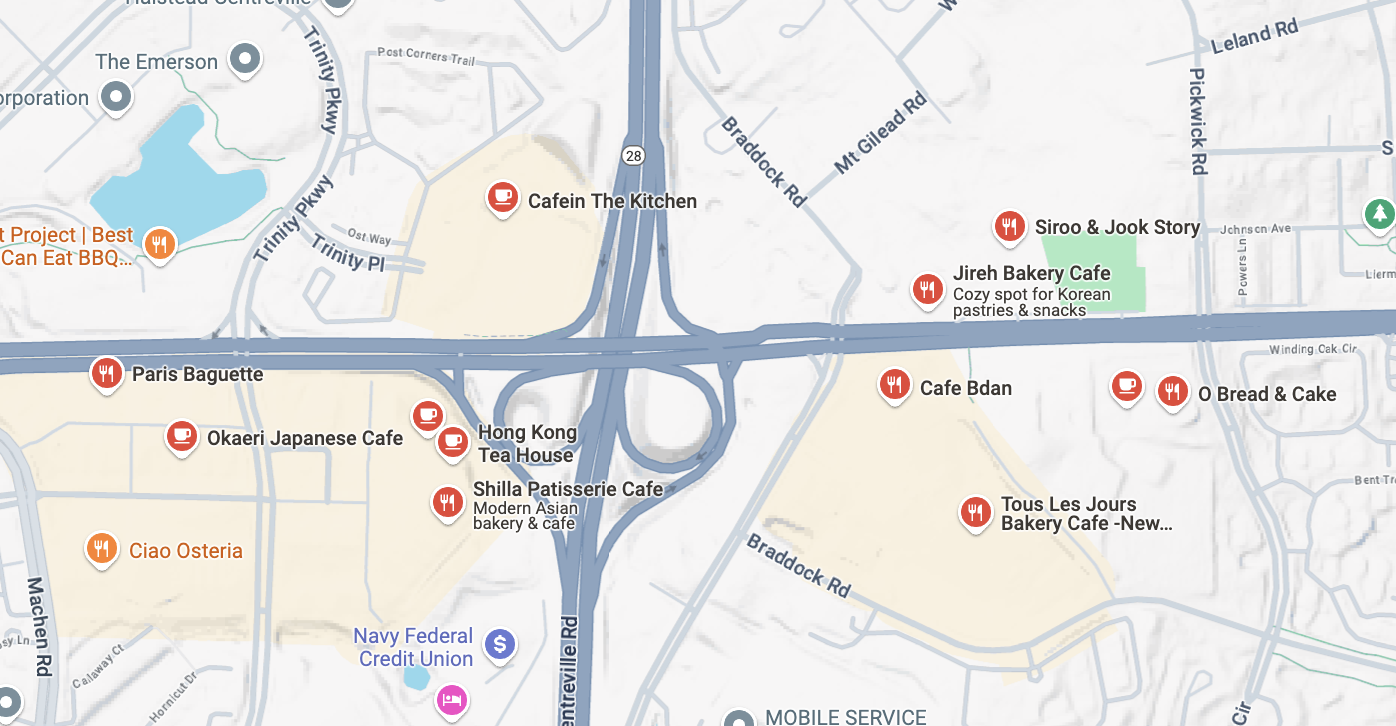
“Create a detailed, hand-drawn-style illustration 16:9 depicting the coffee shops in Centreville, VA from an angled, 3D aerial perspective. Highlight neighborhood roads. Emphasize lush greenery and trees sprinkled naturally throughout the neighborhood, showcasing a friendly suburban atmosphere. Include clearly recognizable intersections and main roads. Use a harmonious, inviting color palette that complements a cozy, suburban aesthetic. Title it at the top, “Cafes in Centreville.”
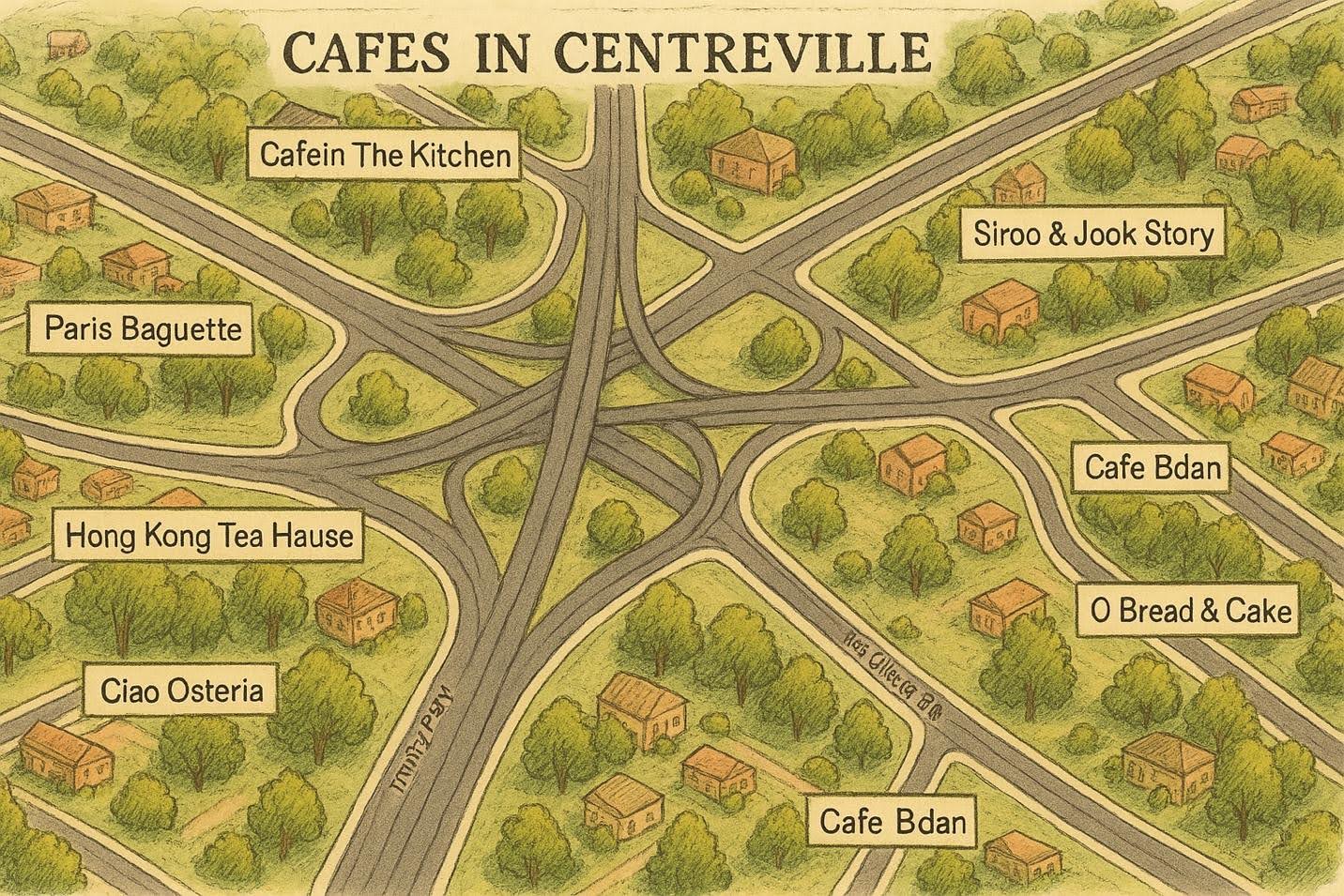
The AI isn’t going to be 100% accurate to scale (so I wouldn’t use it for driving directions), but it’s fantastic as a visual aid. It’s like those charming maps you see in brochures, done on the fly.
Use cases: You can include these maps in your listing presentations or feature sheets to show buyers “what’s nearby” in a visually engaging way. I’ve included community maps in relocation packages, and people love them. It shows that as an agent, you’re knowledgeable and you go the extra mile. One client relocating from out of state said the custom map I provided gave them a better feel for the area than any Google search could.
Plus, it’s great content for social media or your website (SEO bonus: you can write about the neighborhood and include the image).
If you farm a specific neighborhood, imagine having a beautiful map of that community on your website, all made with a quick ChatGPT prompt and a bit of polishing in Canva. It’s a tech-savvy way to showcase local expertise, and it costs basically nothing and very little time. I love this hack for creating hyper-local marketing materials that set you apart from the average agent.
6. HOA Guidelines Visualized
HOA rules and regulations – not the most exciting part of real estate, right? Most homeowners’ associations hand new residents a dense packet of guidelines that no one wants to read.
Here’s a novel idea: use ChatGPT to visualize HOA guidelines and turn them into something people might actually look at! Maybe even make them a magnet to mail out. This hack turns boring text into engaging visuals, which can be super useful for buyer clients moving into a community with an HOA, or even for property managers and HOA boards themselves.
Think about it: Instead of a list of “Do’s and Don’ts” on paper, you present a one-page infographic or a series of images that illustrate the key rules. For example, if the HOA has a rule about trash cans needing to be out of sight except on pickup day, you could have an image of a house with a trash bin and a friendly red X over it (or a calendar icon showing pickup day).
If there are guidelines on permissible fence styles, generate a graphic showing the approved fence vs. one not approved. ChatGPT can create these little illustrations.
I might prompt,
“Generate an image with two side-by-side small illustrations: one of a neatly kept lawn with a happy face, and one of an overgrown lawn with a sad face, to represent HOA yard maintenance rules.”
It will give me something along those lines. Or I could say,
“Create a sign that shows ‘No parking on street overnight’ with a car icon and a red circle-cross.”
That might come out as a simple sign graphic. The possibilities are endless. Essentially, you’re making a visual cheat sheet for the HOA rules.
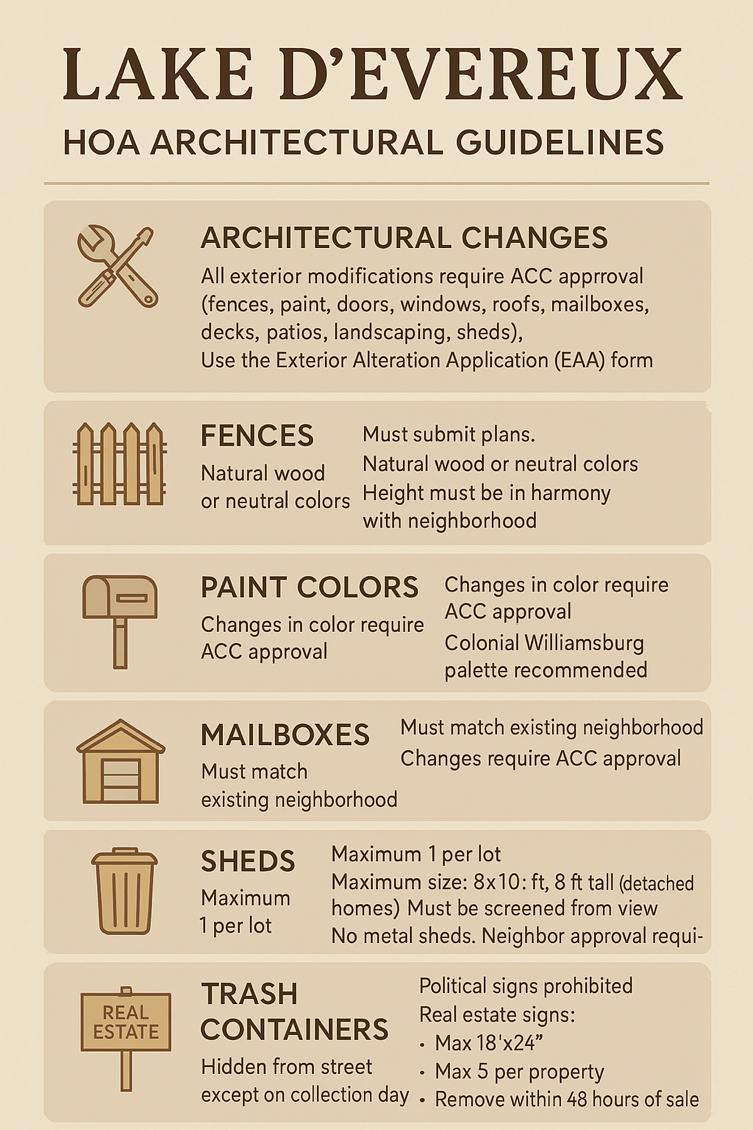
As an agent, creating one is a value-add that positions you as a community expert. And thanks to ChatGPT’s image generation, you don’t need a graphic designer to whip up cute icons for “no loud music after 10pm” or “pets must be on leash”.
Remember: people absorb visuals much better than text. A relevant image paired with info can dramatically improve the recall of that info, so you’re genuinely helping folks remember the do’s and don’ts. It’s a win-win, and it adds a bit of fun to an otherwise dull topic. Consider this hack a way to turn your clients’ “Ugh, HOA rules” into “Hey, this is actually pretty clear – thanks!”
7. Closing Gift Artwork
We all strive to leave a lasting impression on our clients, and a thoughtful closing gift is one way to do it. How about using ChatGPT’s image powers to create custom artwork as a closing gift? This hack is not just clever; it’s heartwarming and personal. And the best part is, it’s unique to each client, yet super easy for you to make with AI.
Here are some ideas: Generate a beautiful watercolor-style painting of your client’s new home.
All you need is a photo of the house. Uload it to ChatGPT and say,
“Turn this photo into a watercolor painting style image.”
Out comes a lovely artistic rendition of the home. Print that on nice paper or canvas, frame it, and voila – a meaningful gift.
Senior homeowners who have lived in their home for thirty years absolutely adore having a painting of their new home; it’s something they’ll treasure (and it’s a great conversation piece that subtly advertises you when friends see it on their wall!).
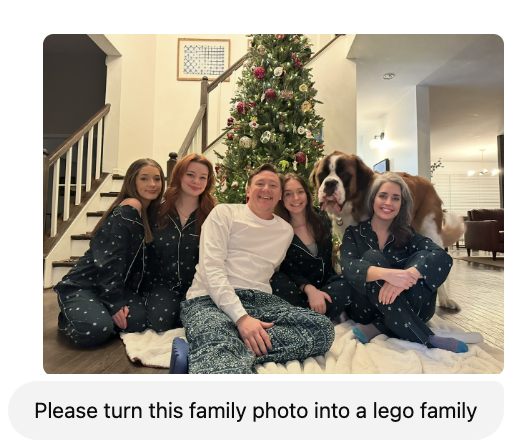
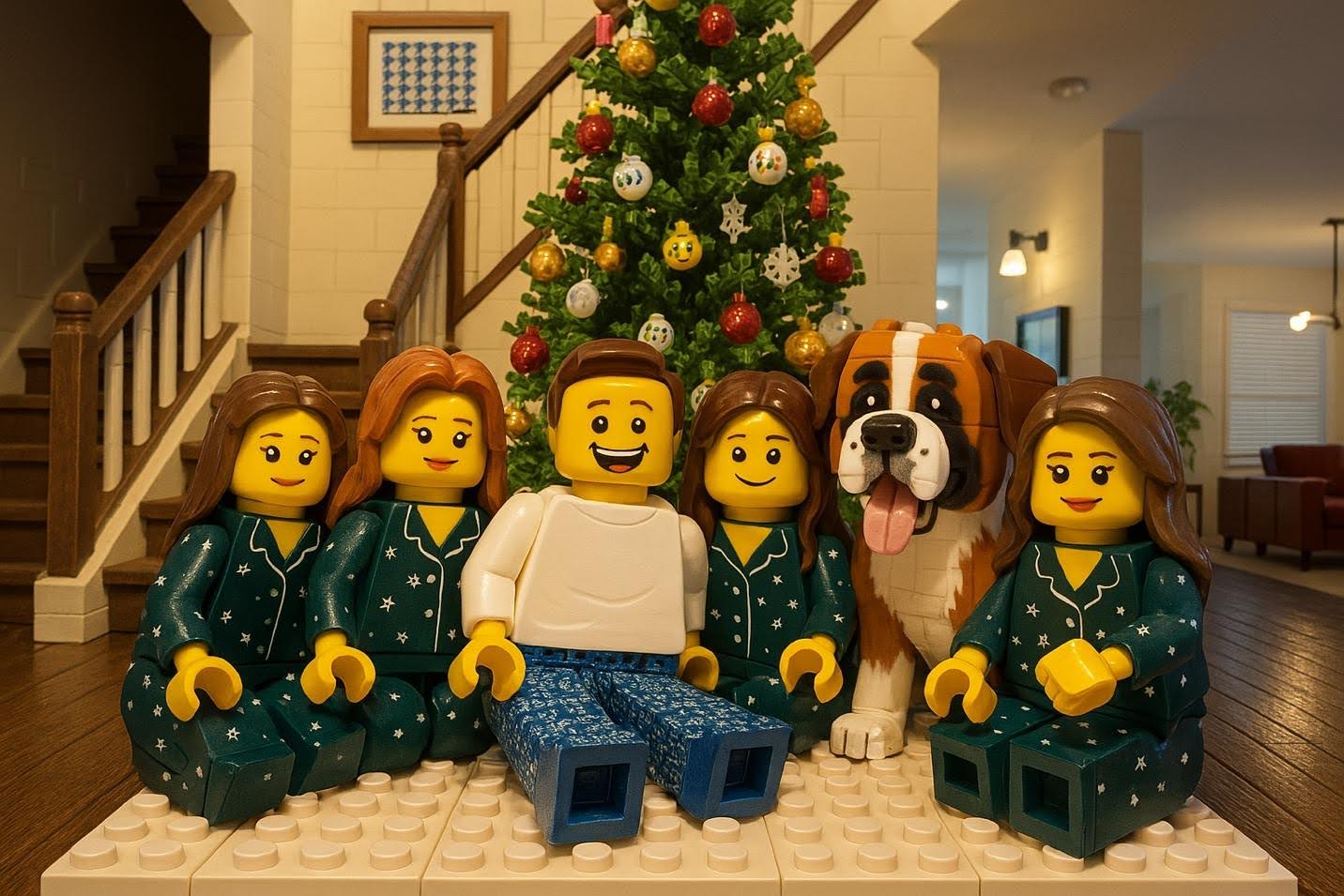
Or, for that one client that has a giant Lego collection, find a social media post and ask GPT for a Lego family portrait.
8. Exterior Season Changes
Ever had great listing photos taken in the summer, but now it’s winter, and you wish you could show buyers what the home looks like with snow on the roof?
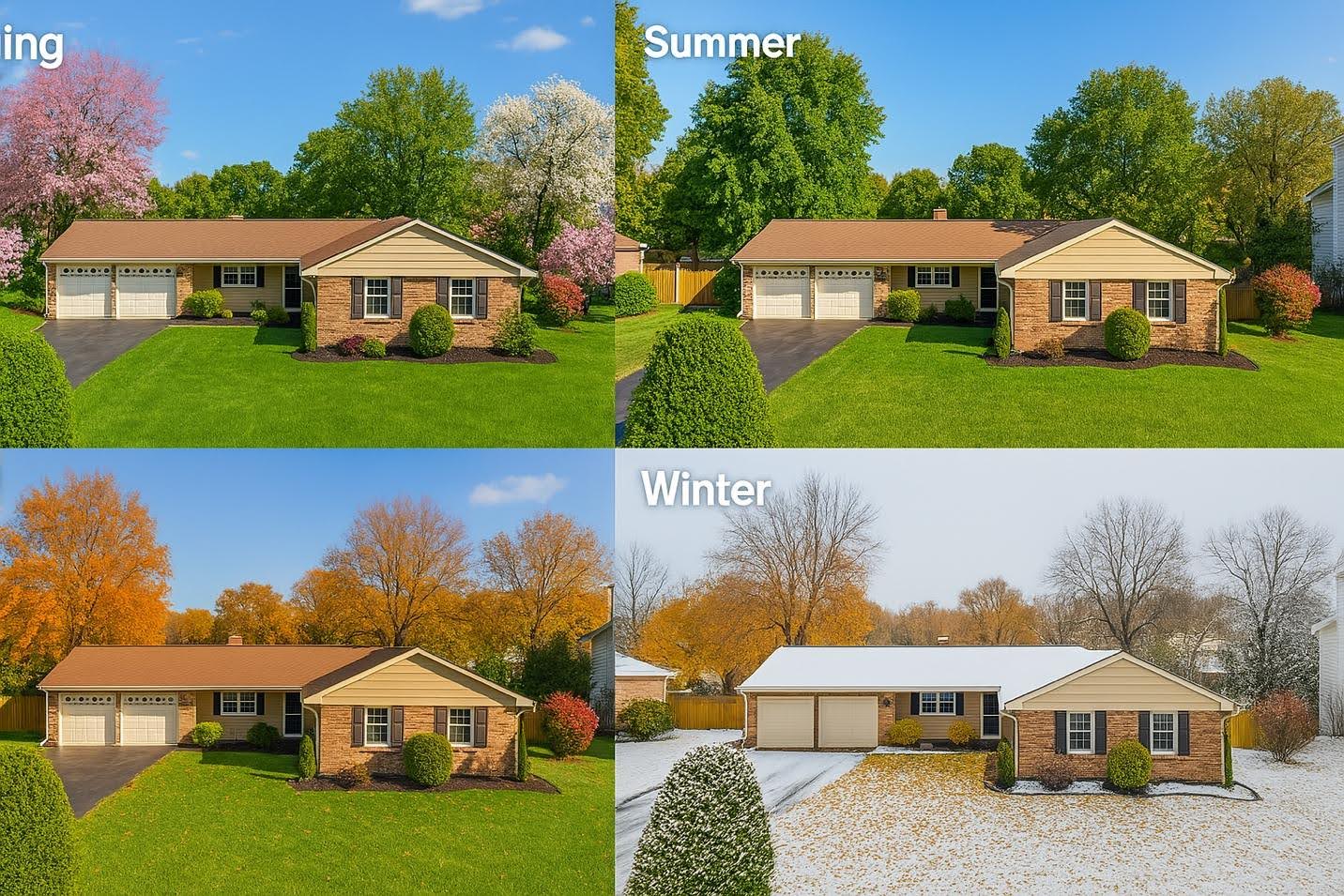
Or maybe you took photos in winter and want to show the home with lush green landscaping in spring. With ChatGPT’s image gen, you can change the season or weather in a property photo – essentially time-traveling your listing photography! This is both a marketing advantage and a bit of a party trick to wow clients.
Here’s how it works: feed ChatGPT a photo of the home’s exterior and then ask for a seasonal transformation. For example,
“Here’s a photo of my listing on Maple Street in summer. Please show it as if it were winter, with snow on the ground and on the roof, and maybe a wreath on the door.”
ChatGPT will produce an image of that house in a snowy setting – bare trees, a light dusting of snow, the whole Norman Rockwell scene.
It can do the reverse, too:
“Turn this snowy house photo into a spring scene with flowers blooming and a sunny sky.”
In a few moments, you have a new image. The architecture and perspective match because it’s based on the original photo, but the season has changed.
I’ve used this to create a “year-round” collage for a listing: one image in each season. It helps buyers see the property’s year-round appeal. It’s also handy if you want to do holiday-themed marketing.
From a practical standpoint, this hack can also solve timing issues. Maybe you listed the home in January when the landscaping was dead; you can generate a lush green version to show how it looks in summer (helpful for out-of-town buyers who won’t see it till spring).
Or if you took photos on a gloomy day, you can ask ChatGPT to “make it a sunny day with blue sky.” A bright exterior photo can significantly boost appeal. In fact, generative AI can change not only seasons but also the time of day, weather, etc. It’s like Photoshop on steroids, but easier – you just ask for what you want. One time I even removed an ugly cloudy sky and replaced it with a sunset with zero Photoshop skills, just by prompting AI.
My clients have been impressed by this, often asking, “How did you do that?!” It positions you as a cutting-edge agent who leverages technology to market properties in the best light (literally and figuratively). And between us, it’s just plain cool to play with.
Just remember to use these altered images responsibly. Done right, showing multiple seasons or a nicer day can enhance your marketing and storytelling for the home without crossing any ethical lines.
Bonus Tip
These 8 hacks are just the tip of the iceberg. If you’re as pumped as I am about using AI in real estate, you’ll find even more strategies in my book, Six Weeks to Real Estate Success. It’s an actionable guide packed with modern tips for ambitious agents.
In the meantime, give these ChatGPT image hacks a try. Which hack are you most excited to try?