

For six of the last ten years, I ran a social media agency for Realtors (not anymore… honestly, it was exhausting). During that time, we managed hundreds of real estate social media accounts for all types of agents and even many of the real estate ‘celebs’ and influencers. With all of that experience, it became really easy to identify the simple changes that lead to better conversion and overall progress on social media!
I absolutely love doing social media audits for other agents, but I don’t have enough time to do all of the IG audits. So, here is my step-by-step self-audit guide to help you make your own adjustments!
How to Audit Your Instagram Profile
Step 1: Review Your Username
Your username is the first point of contact for potential clients. Take a few minutes to review your handle and ask yourself:
- Is my username clear and easy to remember?
- Would someone be able to type it easily if I said it aloud?
- Can I make it shorter or remove any unnecessary symbols, numbers, or characters?
Ideally, a great username should include your name and, if possible, a real estate-related term like “Realtor” or “Real Estate.”
Examples of clear, effective usernames:
Pro Tip: Consider getting verified on Instagram. Although it’s optional, the $14/month verification badge can add credibility to your account and help avoid scams or fake accounts in your name.
Step 2: Optimize the “Name” Section on Your Profile
The “Name” section is crucial for Instagram’s SEO. This is what appears in search results when someone searches for terms related to your services or location. If you’re verified, you’ll need to use your legal name here, but you can still add additional keywords to improve searchability.
Ask yourself:
- Does my “Name” section include my real name and relevant keywords?
- Have I included location-specific or niche terms?
Examples:
- Ramon Casaus | Scottsdale Realtor
- Dan MacKinnon | Sarasota, Siesta Key & Venice Realtor
The key is to use your “Name” section to help people quickly understand who you are and what you do.
Step 3: Craft a Compelling Bio
Your bio is prime Instagram real estate. It’s your chance to communicate who you are, who you help, and how you can benefit clients—all in a few lines. Avoid unnecessary fluff and focus on what matters most.
Suggested Bio Structure:
- Line 1: Clearly state your niche and location.
- Line 2: Mention a credibility point, achievement, or personal statement.
- Line 3: Add a call-to-action that guides people on what to do next (e.g., “Click the link below for…”).
As always, Marie Lee provides a perfect example of a great IG bio!
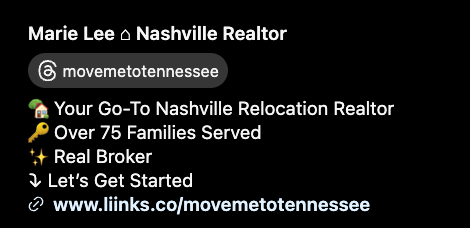
Here are some other examples of a perfect opening line for your IG bio:
- Helping Arizona’s Millennials buy their first homes 🏡
- Relocation expert helping clients settle in Nashville
- Luxury listings expert in West Palm Beach
Pro Tip: Keep emojis and hashtags to a minimum, only using them to enhance the readability of your bio.
Step 4: Perfect Your Profile Photo
For Realtors, a clear, professional profile photo can build instant trust. Choose a headshot that’s easy to see, even on a small screen. Avoid logos unless your profile represents a larger team or brokerage.
Pro Tip: Use the same profile photo across all platforms. This consistency helps with easy recognition and builds brand coherence.
Step 5: Curate Your Instagram Highlights
Instagram highlights are a powerful tool to showcase your brand, services, and expertise in a visually appealing way. Think of your highlights as the menu items of your website: they should give viewers a quick understanding of who you are and what you offer.
Recommended Highlights:
- About Me: Share your background, how you got into real estate, and what sets you apart.
- Buyer Info / Seller Info: Include tips, advice, and FAQs.
- Home Tours: Highlight home tours or neighborhood spotlights.
- Testimonials: Display client reviews and success stories.
- Market Updates: Share recent market trends, stats, or local insights.
- Freebies/Lead Magnet: Offer a specific resource or downloadable guide (e.g., “First-Time Buyer Tips”).
Aim to keep each highlight under 10 slides and avoid having too many highlights (six or seven is plenty). Using cohesive cover images can also enhance your branding and make your profile look polished.
Want Canva templates you can customize for Instagram Highlight covers? Grab them here!
Instagram Highlight Cover Templates
Step 6: Create a Strong CTA (Call-to-Action)
Your call-to-action, typically the last line of your bio, should clearly tell visitors what to do next. Instead of vague instructions like “Visit our site,” opt for more specific phrases that reflect what they’ll get out of it.
CTA Examples:
- New Buyers: Avoid 5 Costly Mistakes—Click Below!
- Calculate Your Home’s Value Here ⤵️
- Book Your Free Buyer Consult Today ⤵️
A specific CTA increases the chances that people will take action and engage with you, turning Instagram visitors into leads.
Step 7: Review Your Link in Bio
The link in your bio is a powerful tool for capturing leads. Try to limit unnecessary links, and instead, choose one main link that brings value to your followers while collecting their contact information.
Effective Link Examples:
- Explore Available Homes in [Your Area]
- New Buyers Start Here
- Book a Complimentary Consult
Pro Tip: Regularly check your links to ensure they’re functioning properly. Broken or outdated links can hurt your credibility and result in missed opportunities. I can’t tell you how often I go to another agent’s link in bio, and half of their links take me to a dead end or broken link.
Step 8: Maximize Your Pinned Posts
Instagram allows you to pin up to three posts to the top of your profile. Use these to highlight your most important content, and create a few opportunities to quickly build trust and capture potential leads.
Ideas for Pinned Posts:
- About Me Post: Share your story, why you’re in real estate, and what your goals are.
- Services Overview: List the services you provide (buyer consultations, relocation services, etc.).
- Lead Magnet Highlight: Showcase the benefits of your lead magnet (e.g., “Download the Top 5 Buyer Mistakes to Avoid”).
- Client Testimonials: Display carousel posts with recent reviews.
- Authority-Building Content: Highlight any awards, recognitions, or media features.
Using pinned posts effectively makes your profile look professional and gives followers a quick, valuable overview of your expertise.
Final Checklist for Your Instagram Profile Audit
Use this quick checklist to make sure you’ve covered everything:
- Username: Clear, easy to say, and includes your name or niche.
- Name Section: Includes your name + location or keyword (e.g., “John Doe | Scottsdale Realtor”).
- Bio: Communicates your niche, builds credibility, and includes a strong CTA.
- Profile Photo: Professional, recognizable, and consistent across platforms.
- Highlights: Organized with cohesive covers, minimal slides per highlight.
- CTA in Bio: Clear and specific, directing followers to one primary link.
- Link in Bio: Functional, updated, and drives followers to a lead capture page.
- Pinned Posts: Highlights key aspects of your brand and services.
Now that you’ve got your profile set up properly, it is important to make sure you do the most important thing, which is to show up consistently with your content. If you need help batching out 30 pieces of content in 90 minutes without burning out, you can read my guide on that here.